Why is Black Friday won in Q1, not Q4?
Top-quartile brands don't switch on upper-funnel spend for peak, they hold it above 20% all year round. Here's the client data behind why Q4 is won early.
All
Learn More

Meta Muse is a personal AI agent that plans and carries out tasks across connected apps. Learn what it does for small businesses and how to check its answers.
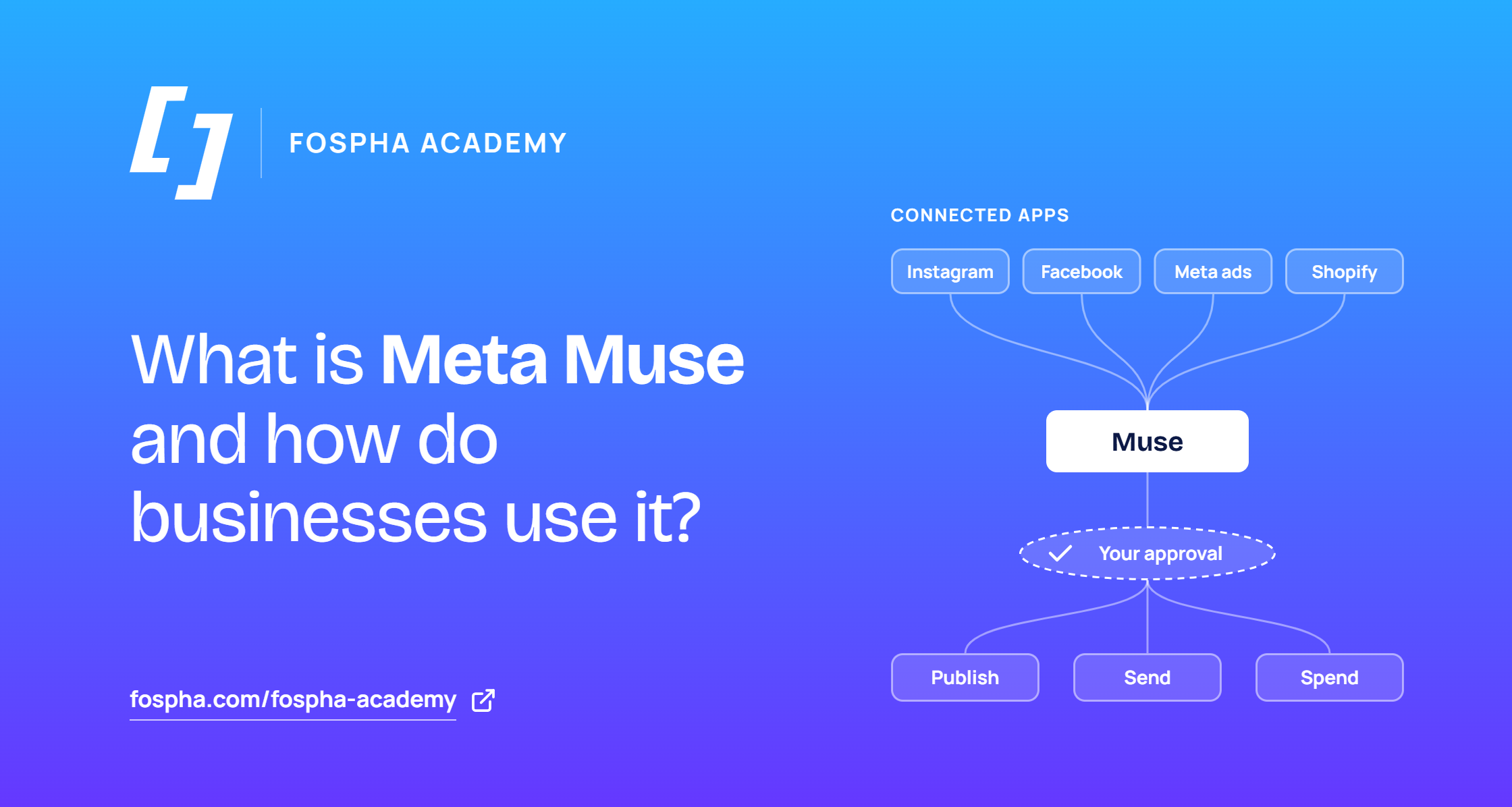
Meta Muse is a personal artificial intelligence (AI) agent: software that plans and carries out tasks for you, beyond answering questions. It runs on its own cloud computer, connects to the apps you choose, and asks for approval before it publishes, sends or spends. In late September 2026, Meta added business connectors and skills for small companies.
Meta estimates, from a user survey, that at least 500 million self-identified small businesses use its apps to reach customers and generate revenue (Meta Q3 2026 earnings call). Muse for Small Business sits on top of Instagram analytics, Facebook Pages and ad accounts. Owners now have to decide which accounts to connect, how much access to grant, and how far to trust what comes back.
Muse is an AI agent that works toward a goal you give it, using connected apps and a browser, and keeps working after you close the chat. Meta launched it in the US on September 8, 2026 (Meta Newsroom). You can use it through the Muse app on iOS, Android and Mac, on muse.ai, or inside WhatsApp.
Each person’s Muse runs on its own cloud computer, which Meta calls a virtual machine. Muse is separate from Meta AI, the assistant built into Facebook, Instagram and WhatsApp.
The free tier uses Meta’s Muse Spark model and has a weekly usage limit. Paid plans cost $20 and $100 a month, add usage, and include access to a larger model called Muse Wonder. Meta describes subscriptions as in limited testing. Muse is available in the US, Canada, Japan and Singapore.
Muse for Small Business is an expansion of the same app, not a separate product. Meta’s chief financial officer, Susan Li, described it on the Q3 2026 earnings call as “a set of new skills and connectors inside the existing Muse app” (earnings call transcript).
A connector is a link that lets Muse read from, or act in, another app. Muse can connect Instagram professional account analytics, Facebook Pages and Meta ad accounts. Meta also names 15 outside tools: Asana, Box, Canva, Dropbox, Figma, Granola, HighLevel, Intuit QuickBooks, Klaviyo, Lovable, Notion, Shopify, Slack, Stripe and Zoom.
The Shopify connector shows how specific the access can be. Muse can read orders, customers and analytics. After confirmation, it can create or update products, collections, inventory and percentage-off discount codes. It cannot issue refunds or cancel orders.
Muse can analyze ad and content performance, draft campaigns and customer replies, and flag issues such as expenses that look off. Meta told press that the request owners make most often is to assess which ad campaigns are working. Other early uses Li listed were organizing direct messages, expanding sales reach, keeping a website current with inventory, and balancing employee workload.
One documented workflow comes from Krys Benyamein, a realtor and Inman columnist. He had Muse analyze 1,133 of his Instagram posts. His first prompt asked it to name his biggest weakness and show the data behind that conclusion, before creating any new content. Muse found that part of an apparent drop in views came from viral posts aging out of the reporting window (Inman). The order of those prompts is the transferable lesson: diagnose first, then create.
Meta says nothing publishes, sends or spends without the owner’s approval. When Muse asks to act, owners can choose to allow once, allow for a task or site, always allow, or deny. An activity log records what Muse did, and connectors can be disconnected at any time. Data from a disconnected connector may remain in Muse’s memories and conversation history. Meta also says Muse conversations and virtual machine data are not shared with its ad systems, and users can opt out of having their interactions used to train its models.
On the October 21 call, Mark Zuckerberg said more than 10 million people in the US and Canada had set up Muse, and about 25% of them use it on a given day. Shopping was the most common use. More than 25% of weekly users engaged in shopping, with an average purchase size over $200 that includes travel.
Treat it as a fast first pass that you check. Jack Johnston of Tinuiti told Marketing Brew that Muse’s campaign tools are a useful guide for owners new to Meta ads but less sophisticated than what experienced Ads Manager users need. Jeremy Schulkin of Hawke Media asked whether an agent reviewing Meta spend would ever recommend moving budget off Meta.
Four habits follow from that:
Muse is Meta’s personal AI agent, and Muse for Small Business adds connectors to Meta accounts and 15 outside tools. It can analyze performance and draft campaigns and replies, with owner approval before it acts. Early usage figures come from Meta and mostly describe consumer shopping. Ask for the underlying data and check the answers against reporting you trust.